As an Amazon Associate this site earns from qualifying purchases.
Specifications at a glance
| Model | Price | Max air speed | Stated noise | Speeds / modes | Oscillation | Timer | Remote | Height |
|---|---|---|---|---|---|---|---|---|
| DREO Tower Fan (28ft/s, 8 Speeds), B09MKPDJRT | Check price on Amazon | 28 ft/s, projects to 34 ft | 20 dB | 8 speeds / 4 modes | 90° | Not stated | Yes | Not stated |
| Levoit Tower Fan (28ft/s, 28dB), B0BVZFQ4DF | Check price on Amazon | 28 ft/s | 28 dB | 5 speeds / 4 modes | Wide angle, degrees not stated | 12-hour | Yes | Not stated |
| Amazon Basics 28" Oscillating Tower Fan | Check price on Amazon | Not stated | Not stated | 3 speeds | 60° | Not stated | Not stated (mechanical controls) | 27.8"H x 9.4"D x 9.4"W |
| Levoit Adjustable-Height Tower Fan, B0GVD6D2KL | Check price on Amazon | 23 ft/s | 28 dB | 5 speeds / 4 modes | 90° | 12-hour | Yes | 36"–47", converts to 24" |
| Honeywell QuietSet HYF260 | Check price on Amazon | Not stated | Not stated | 5 sound/power settings | Yes, degrees not stated | Auto shut-off timer | Yes | Not stated |
| DREO Tower Fan 307 (DR-HTF007), B0D6R9NWBB | Check price on Amazon | 25 ft/s | Not stated | 4 speeds / 4 modes | 90° | 8-hour | Yes | 36 inches |
Quick answer: Tower fans don't lower air temperature — they move air, so "what size do I need" is really a question about air speed, throw distance and height, not square footage. For a bedroom or home office where quiet matters more than raw power, a DC-motor tower rated in the 20s of decibels with a timer and a remote is the shape to look for, such as the DREO Tower Fan for Bedroom, 28ft/s Velocity, 20dB Ultra Quiet, 8 Speeds at $64.97. Everything below is about matching those numbers to your room instead of guessing.
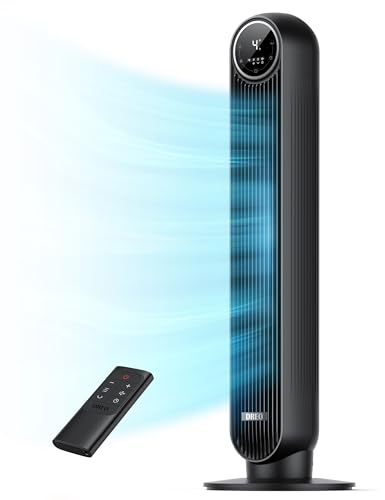
- 𝐏𝐨𝐰𝐞𝐫𝐟𝐮𝐥 𝐀𝐢𝐫𝐟𝐥𝐨𝐰 𝐰𝐢𝐭𝐡 𝐮𝐩𝐠𝐫𝐚𝐝𝐞𝐝 𝐃𝐂 𝐦𝐨𝐭𝐨𝐫: Thanks to DREO's upgraded brushless DC motor combined, the tower fan achieves faster spin to deliver
- 𝐐𝐮𝐢𝐞𝐭-𝐎𝐩𝐭𝐢𝐦𝐢𝐳𝐞𝐝 𝐏𝐞𝐫𝐟𝐨𝐫𝐦𝐚𝐧𝐜𝐞: Featuring an algorithmic impeller design, and an upgraded DC motor, this tower fan delivers quiet operation, making it ideal
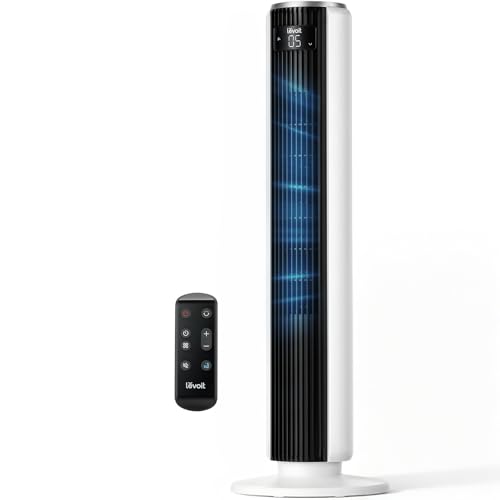
- 𝗢𝗻𝗲 𝗙𝗮𝗻 𝗳𝗼𝗿 𝗔𝗹𝗹 𝗬𝗼𝘂𝗿 𝗡𝗲𝗲𝗱𝘀: From a gentle breeze to a powerful wind, it adapts to your everyday needs with up to 28 ft/s airflow and a wide oscillation angle
- 𝗤𝘂𝗶𝗲𝘁 𝗦𝗹𝗲𝗲𝗽 𝗔𝗹𝗹 𝗡𝗶𝗴𝗵𝘁: Perfect bedroom fan with a near-silent noise level on low speed. Includes a 12-hour timer for all-night comfort and is ideal for light
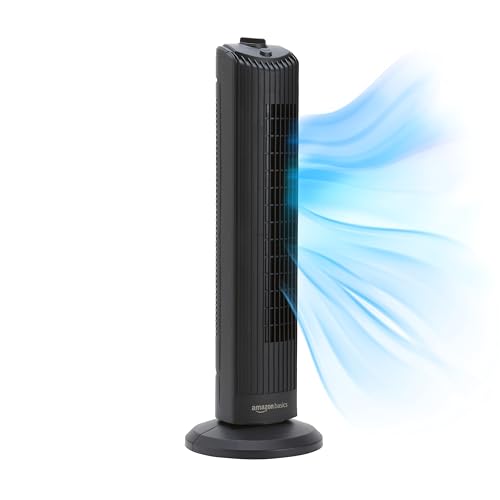
- EFFICIENT COOLING: Designed to provide effective cooling, this oscillating bedroom fan delivers powerful airflow, making the tower fan ideal for enclosed spaces and providing
- CUSTOMIZABLE SPEEDS: Enjoy personalized comfort with three intuitive speed settings on this small tower fan for bedroom, allowing you to adjust airflow and find the ideal cooling
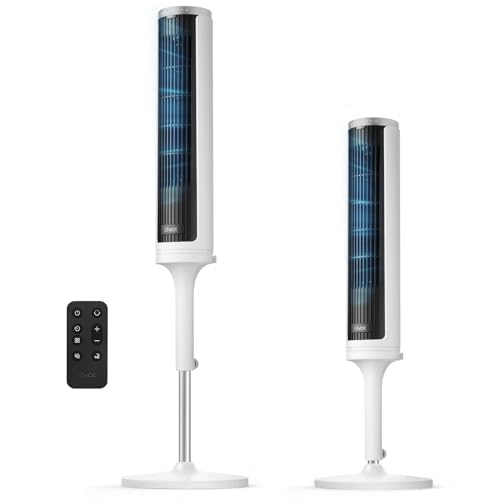
- 𝗣𝗲𝗿𝗳𝗲𝗰𝘁 𝗳𝗼𝗿 𝗛𝗶𝗴𝗵 𝗕𝗲𝗱𝘀: Designed for bedroom comfort and effective airflow, this tower fan adjusts from 36 to 47 inches tall to allow airflow to reach high beds
- 𝗖𝗼𝗺𝗳𝗼𝗿𝘁 𝗬𝗼𝘂 𝗖𝗮𝗻 𝗙𝗲𝗲𝗹: Powered by VORTEXAir Technology, this fan delivers up to 23 ft/s of powerful airflow for consistent and refreshing breeze throughout your
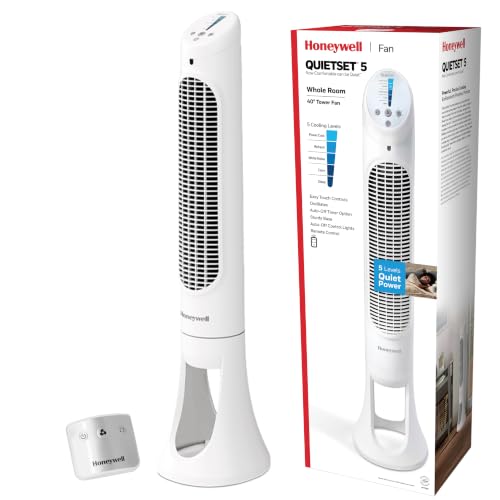
- Reduce energy costs: Save on your air conditioning bill this summer when you combine your Honeywell tower fan with your A/C; set your air conditioner at a higher temperature but
- Quiet cooling: Honeywell's QuietSet remote control tower fans are quiet yet powerful, so you'll feel its cooling power with less sound; great as room fans for bedrooms
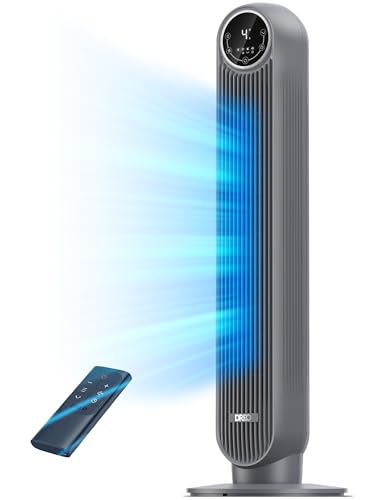
- Powerful Meets Portable: DREO's all-in-one airflow system combines with a supercharged electric motor, delivering high-speed, brisk cool. This 36-inch compact tower fan enlivens
- Cut Out the Fan Noise: Enjoy all-day serenity and comfort, enabled by its aerodynamic impeller design along with display auto off, auto mute in Sleep mode, 8h timer, and soothing
How to size a tower fan for your room
Forget the "X sq ft" claims manufacturers print. A tower fan is a personal-to-medium-room appliance, and three numbers decide whether it will actually reach you:
Air speed (ft/s) and throw. This is the honest spec. The DREO listed above claims 28 ft/s with airflow projected up to 34 ft, which is the difference between feeling the fan from across a living room and only feeling it from four feet away. If a listing doesn't state ft/s or CFM at all, you're buying blind.
The best tower fan buyers guide for your situation depends on how you plan to use it and where.
Height. Tower fans push air in a vertical column, so the column has to intersect your body. A 28-inch tower sitting on the floor blows across a mattress at roughly hip height — fine if you're on a low platform bed, useless if you're on a tall bed with a thick mattress. This is the single most common sizing mistake, and it's why height-adjustable models exist.
Footprint and oscillation arc. Most towers occupy a square under a foot on each side, which is the whole appeal versus a pedestal fan. A 90° oscillation sweeps a corner-to-center arc; 60° is a narrower sweep and better if you want the air concentrated on one seating area.
Rule of thumb: under ~200 sq ft (a bedroom or office), almost any of these will do the job and you should optimize for noise. Over that — a living room, an open-plan space — prioritize the highest stated ft/s you can find and put the fan in a corner aimed diagonally across the room.
Who this pick is for
The DREO Tower Fan for Bedroom, 28ft/s Velocity, 20dB Ultra Quiet, 8 Speeds is aimed at the person whose real complaint is noise, not heat. Its brushless DC motor is what makes the 20 dB figure plausible — DC motors run quieter at low speed and draw less power than the AC motors in cheaper towers. Eight speeds is genuinely more useful than it sounds, because the gap between "too faint" and "too loud" on a three-speed fan is where most people give up and turn the thing off.
It also suits anyone who dislikes cleaning fans, since the rear grille and impeller are removable, and anyone running it in a house with kids or pets: the listing cites a pinch-proof grille, a fused plug, circuit protection and ETL certification.
Who should skip it
Skip it if your bed sits high. This model's height isn't stated in the listing, and a floor-standing tower that can't be raised may blow air under you rather than over you.
Skip it if $65 is more than you want to spend on a seasonal appliance you'll run three months a year. Skip it if you want a fan for a workshop, garage or patio — tower fans are indoor circulators, not high-volume air movers, and a box or drum fan moves far more air per dollar. And skip it if you specifically want a pedestal fan: a tower can't be raised to head height while standing, can't be tilted upward, and has a fixed vertical column rather than a large aimable head.
The honest trade-offs
Tower fans buy you floor space and a tidier look, and you pay for it in three ways. Airflow per dollar is worse than a comparable pedestal or box fan, because the cross-flow impeller design is less efficient than a big open blade. Repairability is near zero — the impeller is a sealed cylinder, and when a tower gets rattly it usually gets replaced. Dust accumulation degrades them noticeably; a tower that's whisper-quiet in June can hum in September purely because the impeller is loaded with dust, which is why the removable-grille feature is more than a marketing bullet.
Also worth saying plainly: a fan does not cool a room. It cools you, via evaporation off your skin. Running one in an empty room is wasted electricity. Running one alongside an air conditioner so you can set the thermostat higher, as both the DREO and Honeywell listings suggest, is the actual energy-saving play.
What to check on the listing before you buy
Listings change, so verify these yourself at the moment of purchase rather than trusting any guide, including this one:
- Current price. All prices here are snapshots. Fan pricing swings hard with the season — the same model is routinely cheaper in October than in July.
- Variant. Colour and size variants often sit on one listing page at different prices, and the price shown in a search result may belong to a variant you didn't select. Confirm the height, colour and model number in the cart, not on the page.
- Whether a remote is included. Some fan lines sell remote and non-remote versions under near-identical names.
- Warranty terms and who honours them. Check the manufacturer's stated warranty length and whether the seller is the brand or a third party.
- Recent reviews, read yourself. Sort by most recent and skim for noise complaints and rattling after a few months — that's the failure pattern for this category. Don't take anyone's summary of what reviewers say, including a guide's; go look.
Consider a different fan if…
Levoit Tower Fan for Bedroom, 28ft/s Fans that Blow Cold Air, 28dB Quiet — consider instead if…
…you want the same 28 ft/s airflow for less money and you like the idea of the fan managing itself. The Levoit Tower Fan for Bedroom, 28ft/s Fans that Blow Cold Air, 28dB Quiet is $54.93 and adds a built-in temperature sensor that adjusts airflow to the room, plus a 12-hour timer and five speeds across Normal, Turbo, Sleep and Auto. Its stated 28 dB is slightly higher than the 20 dB claim above, so it's the pick if you value the sensor and the timer more than the last few decibels.
Amazon Basics 28" 60-Degree Oscillating Tower Fan with Powerful Airflow for Bedroom, Living Room, Office, 3 Speeds, Mechanical Control, Air Circulator, 35W, 27.8"H x 9.4"D x 9.4"W, Black — consider instead if…
…you want the cheapest way to move air and you don't need a remote. The Amazon Basics 28" 60-Degree Oscillating Tower Fan is $36.71 with three speeds, mechanical knob controls, 60° oscillation and a 35W draw in a 27.8" x 9.4" x 9.4" footprint. It's the honest choice for a spare room, a dorm or a guest bedroom. Note what it doesn't publish: no stated noise level and no stated air speed, so if quiet is your priority this is a gamble.
Levoit Tower Fan for Bedroom, Standing Fan with 36"-47" Adjustable Height — consider instead if…
…you sleep on a tall bed, or you want one fan that works on a nightstand and on the floor. The Levoit Tower Fan for Bedroom, Standing Fan with 36"-47" Adjustable Height extends from 36 to 47 inches and drops to a 24-inch low-profile fan when you remove the lower section. At $76.49 it's the priciest here and its 23 ft/s airflow is the lowest stated figure, so you're trading top-end power for the ability to actually aim the air where you sleep.
Honeywell QuietSet Whole Room Oscillating Tower Fan with Remote, White, HYF260 — consider instead if…
…you want a light-sleeper-friendly fan from a long-established brand and you're bothered by glowing control panels. The Honeywell QuietSet Whole Room Oscillating Tower Fan with Remote, White, HYF260 is $49.99 with five combined sound/power settings, oscillation, an auto shut-off timer, a remote, and panel dimming across five levels including fully off. That last feature is rarer than it should be. Its airflow and decibel figures aren't stated in the listing, so it's chosen on the control set rather than on numbers.
DREO Tower Fan for Bedroom, 25ft/s Velocity Quiet Floor Fan, 90° Oscillating Fans for Indoors with 4 Speeds, 4 Modes, 8H Timer, Bladeless Fan, Standing Fans, Grey, Tower Fan 307 (DR-HTF007) — consider instead if…
…you want a taller tower with a published height and a hard timer. The DREO Tower Fan 307 (DR-HTF007) is 36 inches tall, $69.97, moves air at up to 25 ft/s, oscillates 90°, and has an 8-hour timer plus a Sleep mode that auto-mutes and turns the display off. Four speeds instead of eight means coarser control, but the taller column is the reason to pick it.
FAQ
What size tower fan do I need for a bedroom? For a standard bedroom under about 200 sq ft, height matters more than power. Measure from the floor to the top of your mattress; you want the fan's air column to cross above that line. Then pick on noise — a fan you turn off because it's loud cools nothing.
How do I choose between a tower fan and a pedestal fan? Choose a tower for floor space, a slim footprint and looks in a finished room. Choose a pedestal when you need air at standing head height, want to tilt the head upward or downward, or need more airflow for the money. For a quiet pedestal fan specifically, look for the same things listed above: a DC motor, a published decibel figure at the lowest speed, a remote so you're not walking to the fan at 2am, and enough speed steps that there's a usable setting between "nothing" and "wind tunnel."
What features actually matter in a bedroom tower fan? A published low-speed decibel rating, a sleep mode that dims or kills the display, a timer, a remote, and a removable grille for cleaning. Everything else is nice to have.
Where can I buy a tower fan locally? Big-box retailers, hardware stores and supermarkets all stock them seasonally, and in a heatwave local stock is worth the premium. Just note that in-store selection skews toward three-speed AC-motor models; the quiet DC-motor towers are mostly an online purchase.
Related guides
- Best home cooling, heating and fans - ceiling fans, tower fans, space heaters, misting fans, portable air conditioners, window air conditioners with Past Challenges
- Best home cooling, heating and fans - ceiling fans, tower fans, space heaters, misting fans, portable air conditioners, window air conditioners with Limited History
- How to Lower Your Best home cooling, heating and fans - ceiling fans, tower fans, space heaters, misting fans, portable air conditioners, window air conditioners Costs
Key Takeaways
- Choosing the right tower fan buyers guide means matching the key features to your specific needs and budget
- Read real customer reviews and check the return policy before you commit
- Compare value across models — the priciest option is not always the best fit